Find your nearest Bitcoin ATM
- ATM locations
- 84 +

Converter
Easily convert your fiat currency to crypto and vice versa.
Mission
Understand our vision for a transparent and fair economy.
FAQ
Find answers to frequently asked questions.
ByteRewards
Pay. Earn. Experience.
Markets
Track crypto prices in real-time.
News
Stay up to date with the latest news in the crypto world.
Security & Awareness
Stay safe with tips to avoid scams and fraud.
Host a Bitcoin ATM
Earn rewards and attract customers with our ATMs.
Accept Bitcoin
Accept crypto payments with ByteConnect POS system.
Bring Australian notes, a mobile phone, a valid government-issued photo ID, and a Bitcoin wallet with a public receiving QR code. The ATM will guide you from login to confirmation.
Enter your mobile number, use the security code sent to you by SMS, and follow the on-screen prompts.
Register nowOpen the Receive screen in your Bitcoin wallet and scan its public address at the ATM.
Choose your purchase amount and insert notes one at a time while the ATM updates your total.
Check that the inserted amount and wallet details are correct, then press Done to complete your transaction.
Set up your wallet and gather these items before leaving so you can follow the ATM prompts without interruption.
Cash Australian banknotes in good condition.
Mobile phone For your wallet and SMS security code.
Photo ID A valid government-issued document such as an Australian driver licence or passport.
Bitcoin wallet Open the Receive screen so its public QR code is ready to scan.
The ATM shows each prompt on screen. Take a moment to verify the wallet address, cash total, and transaction details before you confirm.
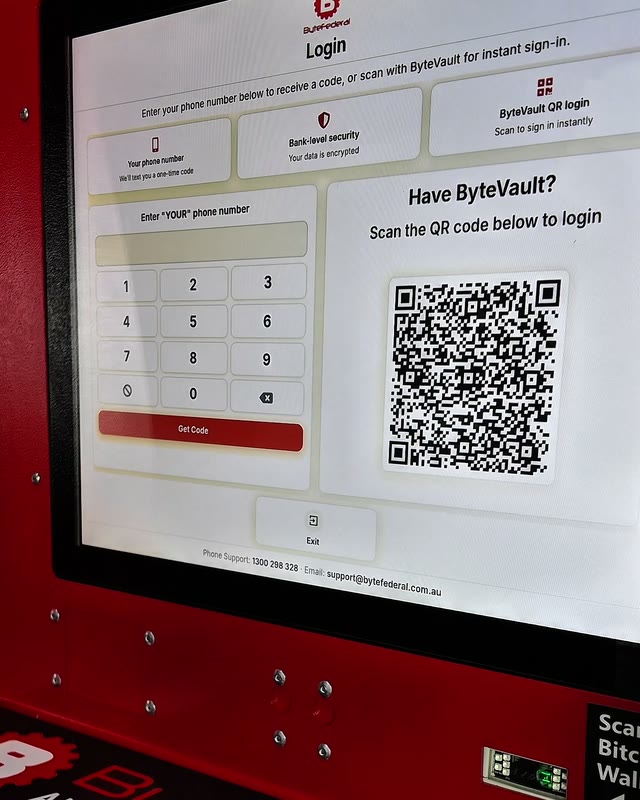
Enter your mobile number, enter the security code sent to you by SMS, and follow the on-screen prompts.
Open the Receive screen in your Bitcoin wallet so its public QR code is visible, then hold it up to the ATM scanner.
Insert your notes one at a time while the ATM updates your total.

Verify that the inserted amount is correct and that everything looks good, then press Done to complete your transaction.
Feedback supplied by Byte Federal Australia customers in New South Wales and Victoria.
“Your ByteFederal machines are the best to deposit easy process and instant receipt available. I have only confidence with your transaction process. Second to none. Cheers Thanks”
“The people who run this are dedicated and smart. There is no other company in Australia that can compare with there help”
“Professional, capable, helpful”
Keep your transaction receipt until the cryptocurrency appears in your wallet. It contains the information support needs to locate the transaction.
| Problem | What to do |
|---|---|
| The wallet QR code will not scan | Open the Receive screen, raise your phone brightness, enlarge the QR code, and make sure you are showing a public receiving address. |
| Bitcoin is not visible in the wallet | Keep the receipt and allow up to 30 minutes for dispatch and network processing. Some wallets wait for a network confirmation before showing the balance. |
| The ATM shows an error | Note the location and ATM serial number, then contact Byte Federal Australia through live chat or call 1300 298 328 |
Find concise answers about preparation, identification, purchase limits, safety, and transaction support in Australia.
Still need help? Contact supportYes. Bring a valid government-issued photo ID and your mobile phone. Identity verification helps protect customers and supports KYC and AML requirements.
Yes. Your wallet provides the public receiving address and QR code the ATM needs to send your Bitcoin. Set up your wallet and back up its recovery phrase before visiting.
In Australia, customers can purchase up to $5,000 in cryptocurrency within a 24-hour period.
The on-screen ATM steps usually take only a few minutes. After purchase, the cryptocurrency may take up to 30 minutes to appear in your wallet while the transaction is dispatched and processed by the network.
Byte Federal Australia ATMs use identity checks and transaction monitoring, but you still control where the cryptocurrency is sent. Use only a wallet you own, protect your recovery phrase, and never transact at the direction of a stranger.
Keep your receipt and note the ATM location or serial number. If the transaction is still not visible after allowing time for network processing, contact Byte Federal Australia through live chat or call 1300 298 328.
A Bitcoin ATM converts physical cash to cryptocurrency at a nearby machine without linking a bank account. An online exchange is account-based and usually requires a bank transfer, debit card, or another electronic payment method.
Find a nearby location, review its hours, and register before you travel to shorten your time at the ATM.